Manage LinkedIn Ads for Results, Not Just Clicks

To manage LinkedIn ads without wasting budget, start with the result you need: qualified leads, sales, or donations. In Campaign Manager, choose that goal, target the professionals most likely to act, and set a budget you can monitor. Then track conversions and cost per result. Move spend toward the campaigns that produce meaningful outcomes, not simply the most clicks.
LinkedIn's job and company targeting can help you reach decision-makers. It cannot tell you whether the spend was worth it unless you measure what happens after someone clicks. This guide covers the setup, targeting, reporting, and conversion tracking needed to make that call.
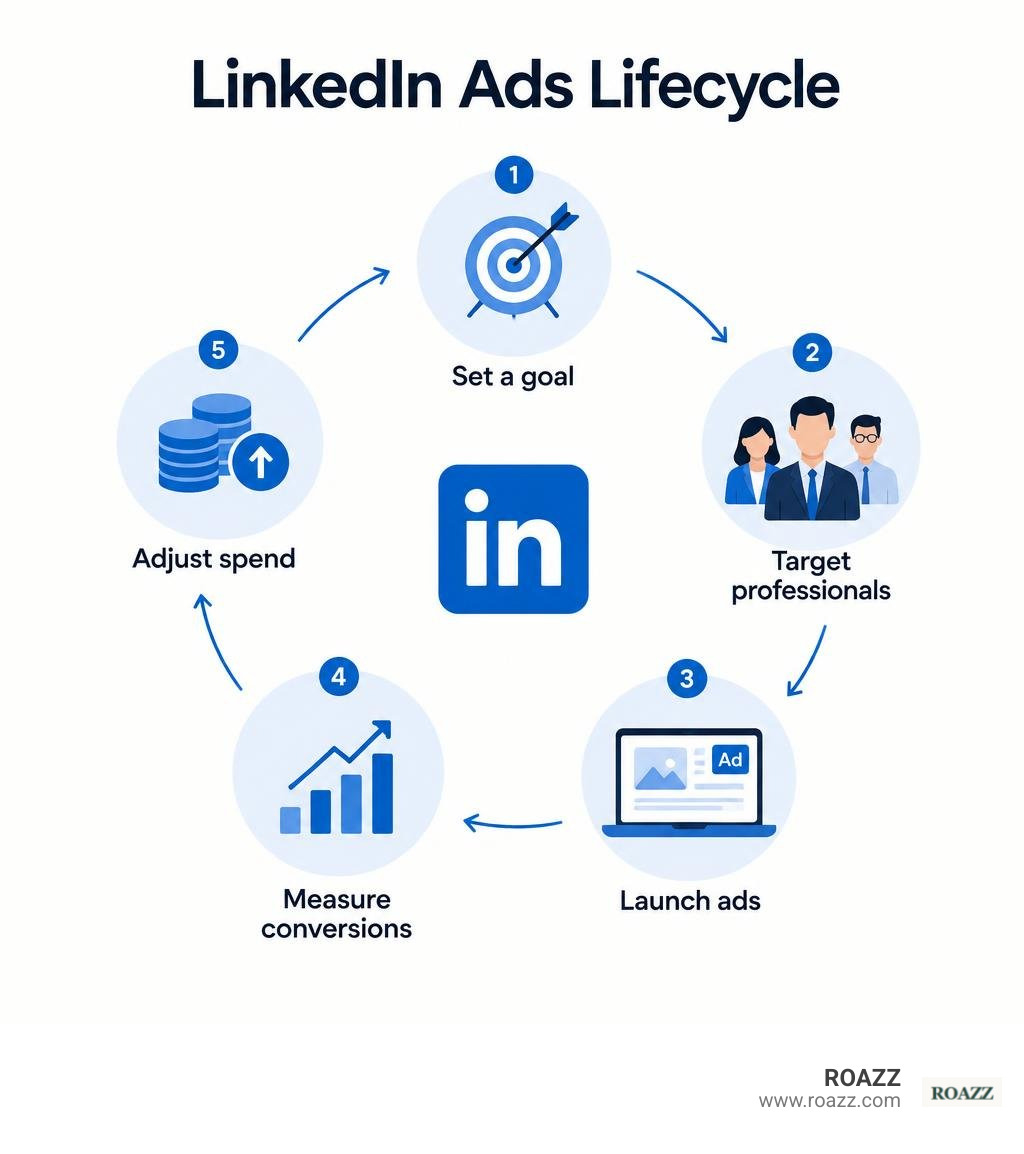
Core Pillars of LinkedIn Ads Management
LinkedIn gives advertisers direct access to a global network of over 900 million professionals. Unlike consumer platforms where users scroll past ads while looking at vacation photos, LinkedIn members actively engage with industry trends, explore career moves, and evaluate enterprise tools.
This environment makes professional targeting uniquely accurate. Instead of guessing who might hold purchasing power, we can pinpoint exact titles, industries, and organizational tiers.
To avoid wasting budget, every campaign must focus on tangible business outcomes rather than vanity metrics. Generating thousands of impressions means very little if none of those viewers book demos or convert into pipeline revenue. Partnering with a dedicated PPC management agency helps businesses build high-intent pipelines rather than merely buying clicks.
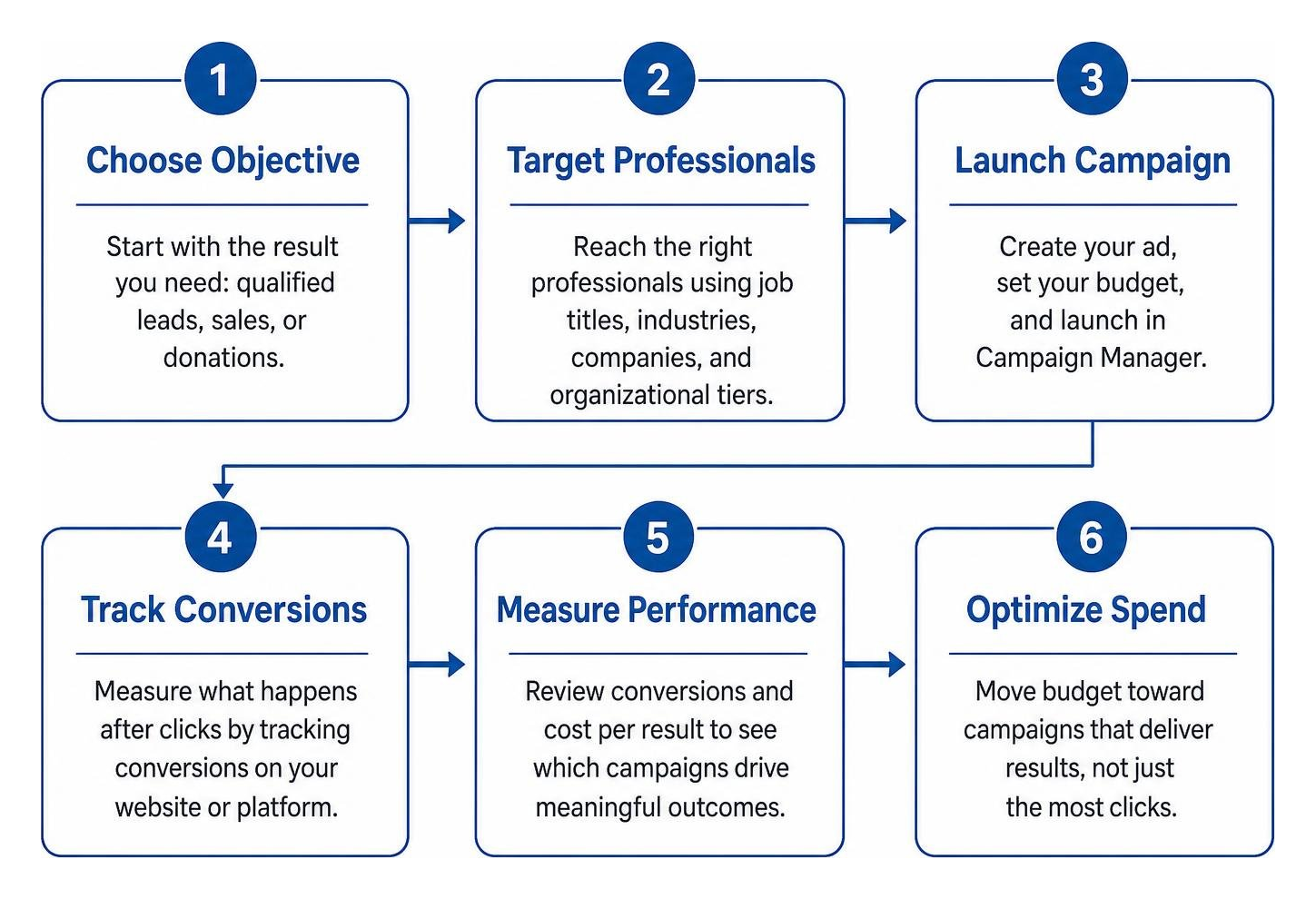
Setting Up Campaign Manager and Launching Your First Ad
Getting started begins inside LinkedIn Campaign Manager. The initial setup requires just a few foundational steps:
- Create an Ad Account: Link your personal LinkedIn profile to Campaign Manager and name your primary ad account.
- Associate and Verify Your LinkedIn Page: Connect your official business page. You must hold administrative permissions on that page to run sponsored creatives.
- Select Your Campaign Objective: Choose from brand awareness, website visits, engagement, video views, lead generation, website conversions, or job applicants. Pick the objective that matches your true post-click goal.
- Establish Budget Pacing and Bidding: Choose between daily budgets or lifetime caps. Starting with manual or target cost bidding gives you direct control over your maximum cost per click (CPC) while algorithms calibrate.
Choosing High-Performing Formats: Sponsored Updates, Dynamic Ads, and InMails
Selecting the right ad format depends directly on what action you want a prospect to take.
- Sponsored Updates (Single Image & Video): These native feed ads integrate seamlessly into the desktop and mobile newsfeed, making them ideal for case studies and product announcements.
- Document Ads: Perfect for thought leadership, Document Ads let prospects read or download whitepapers directly within their feed, removing friction from B2B lead generation.
- Text Ads & Spotlight Ads: Located in the right rail of the desktop interface, these formats offer lower CPCs and provide continuous, cost-effective brand presence.
- Sponsored InMails / Message Ads: Deliver tailored messages directly to a prospect's LinkedIn inbox, triggering notifications when the recipient is active on the platform.
| Ad Format | Best Funnel Stage | Primary Objective | Relative Cost |
|---|---|---|---|
| Sponsored Content | Top & Middle Funnel | Brand Awareness, Web Traffic | Moderate to High |
| Document Ads | Middle Funnel | Lead Gen, Gated Resources | Moderate |
| Message Ads / InMail | Bottom Funnel | Event Registration, Demos | High |
| Text Ads | Bottom Funnel Retargeting | Sustained Brand Awareness | Low |
| Lead Gen Forms | Middle & Bottom Funnel | Demo Requests, Downloads | Moderate to High |
Advanced Targeting Strategies to Reach Decision-Makers
The true value of LinkedIn advertising lies in firmographic depth. Navigating these options carefully ensures you reach real decision-makers without inflating your costs.
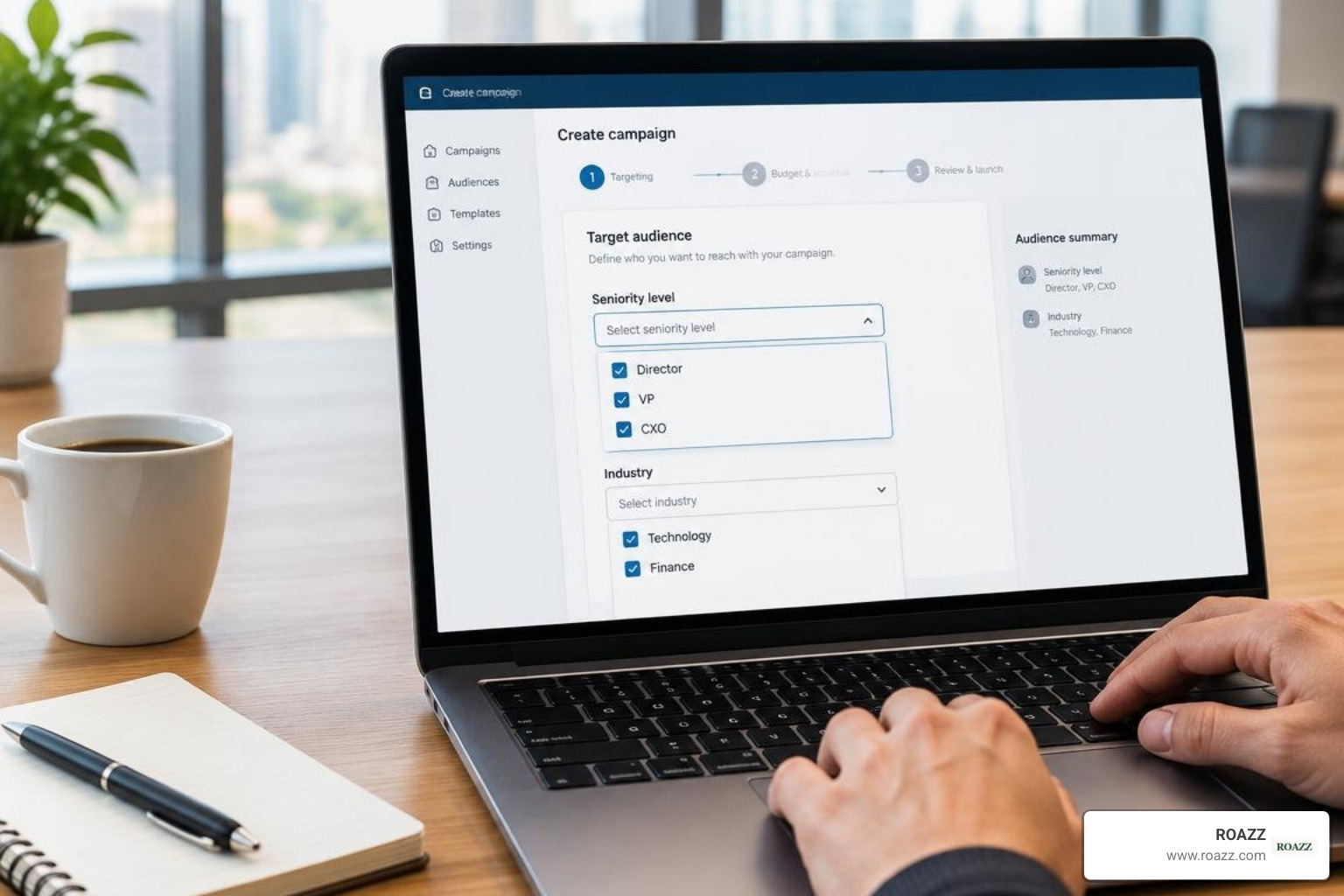
To build effective audiences, combine these core parameters:
- Job Function & Seniority: Focus on functions such as "Information Technology" or "Finance," and layer seniority filters like "Director," "VP," or "CXO."
- Industry Classification & Company Size: Restrict ad delivery to high-yield verticals, whether that means mid-market SaaS companies or enterprise logistics firms.
- Skills and Group Membership: Refine broad titles by requiring specific technical proficiencies or active membership in relevant industry groups.
When managing complex B2B pipelines, many businesses choose outsourced PPC management to handle audience testing and prevent budget waste.
Combining Account-Based Targeting with Buyer Intent
Account-Based Marketing (ABM) on LinkedIn lets you upload designated target company lists directly into Campaign Manager.
By matching account lists against LinkedIn's member graph, you can deliver tailored messaging to key stakeholders inside specific target accounts. Combine this list matching with website retargeting to re-engage accounts that visited pricing pages.
Always apply strict negative audience exclusions. Exclude your current employees, active customers, competitors, and non-buying job functions to ensure every dollar targets fresh pipeline.
Scaling Workflows: API Integrations and Centralized Consoles
Managing campaigns across multiple accounts can become cumbersome inside the native interface. Modern teams streamline execution using custom endpoints or specialized connectors like the LinkedIn Ads integration provided by developer platforms.
Automating these workflows connects campaign delivery with wider multichannel strategies, such as programmatic digital advertising, giving teams unified control over performance data.
Developer Setup: OAuth Scopes and App Verification for LinkedIn Ads Management
Building direct tools for scalable campaign control requires registering an application in the LinkedIn Developer Portal using OAuth 2.0 authentication.
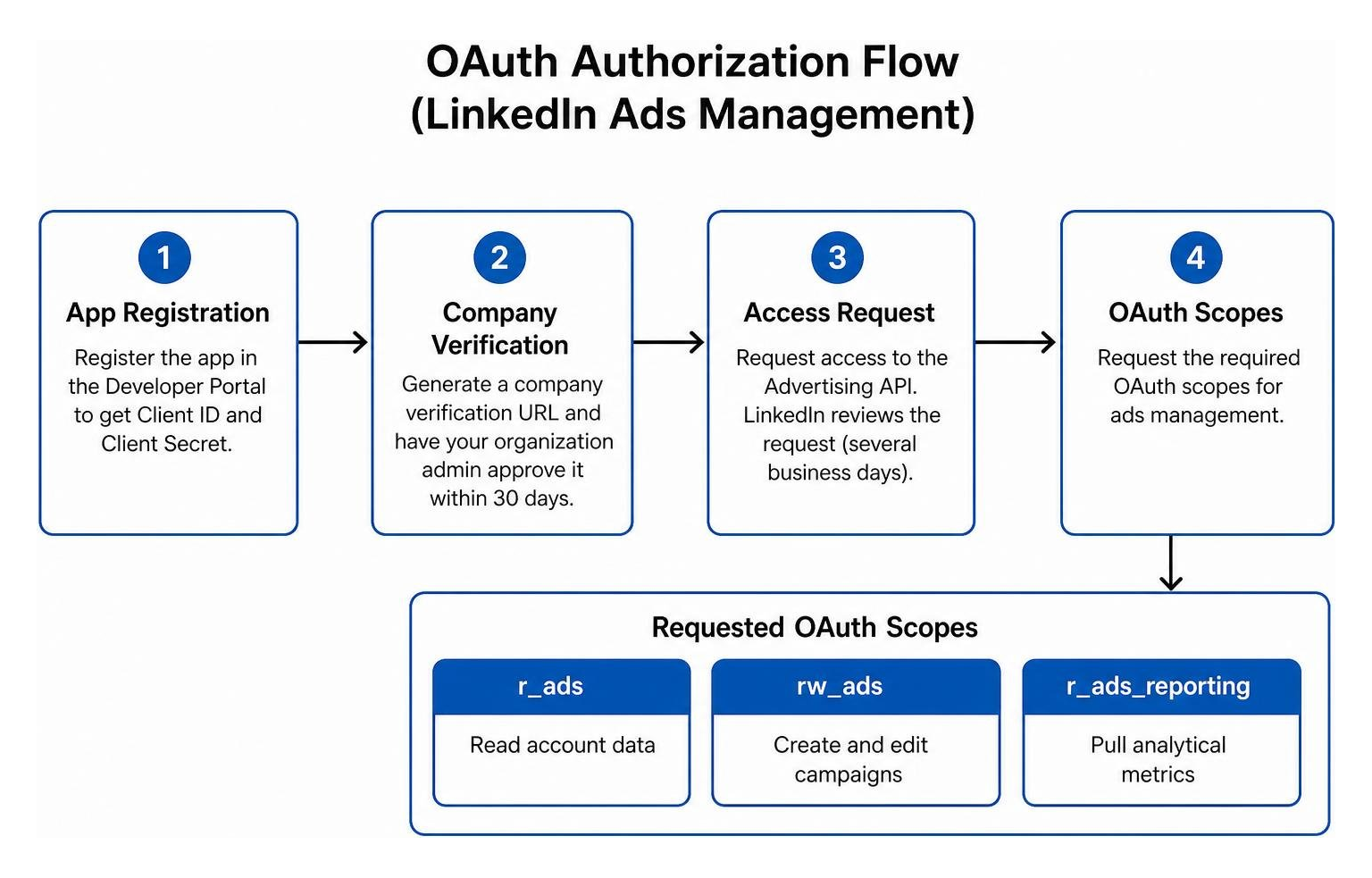
- Create the App: Register your application within the Developer Portal to generate your Client ID and Client Secret.
- Verify Company Association: Under the app settings, generate a company verification URL and have your organization page administrator approve it within 30 days.
- Request Advertising API Access: Submit an access request for the Advertising API. This undergoes manual review by LinkedIn, which usually takes several business days.
- Configure OAuth Scopes: Request specific permissions, including
r_ads(read account data),rw_ads(create and edit campaigns), andr_ads_reporting(pull analytical metrics).
Centralized Control and Browser Extension Workflows
Deploying unified dashboards, such as the LinkedIn Advertising API Integration architecture used in modern consoles, brings ad creation, performance analytics, and budget pacing into one workspace.
These integrations typically support four primary API routes:
- Retrieving ad account lists
- Creating and managing active campaigns
- Pulling granular performance data
- Streaming real-time conversion events
Companion browser extensions build on this functionality by adding context-menu shortcuts right on the LinkedIn feed. Marketers can check real-time ad performance or spin up lead generation ads on the fly without switching back and forth between administrative tabs.
Measuring ROI and Privacy-First Conversion Tracking
High click-through rates never guarantee bottom-line growth. Sustainable campaign management requires tracking the full journey from initial click to closed contract. Working with an experienced PPC lead generation agency ensures every touchpoint is tied directly to qualified revenue.

Privacy-Preserving Conversions and SHA-256 Data Hashing
Modern tracking requires balancing accurate attribution with strict user privacy. LinkedIn's conversion tracking engine handles this through secure data hashing.
When sending offline conversions, CRM events, or API payloads via the rw_conversions scope, sensitive member details (such as email addresses) must be processed through SHA-256 cryptographic hashing before transmission. The API payload pairs this hashed string with a designated conversionRuleId, monetary amount, currency, and timestamp.
This lets LinkedIn match conversion actions to specific ad interactions while keeping raw, personally identifiable data completely private.
Best Practices for Continuous Optimization
To maintain strong return on ad spend (ROAS), build a structured review cadence into your weekly workflow:
- Review Campaign Manager Recommandations: Use LinkedIn's predictive insights to spot bidding inefficiencies and identify high-performing audience segments.
- Track Outcome-Driven Metrics: Look beyond top-line impressions and base decisions on Cost Per Acquisition (CPA), conversion rates, and pipeline velocity.
- Run Systematic Creative A/B Tests: Test single-variable changes across headlines, ad creative, and value propositions. Document your findings alongside case studies to repeat winning creative angles.
- Reallocate Spend Toward Top Performers: Move budget out of underperforming audiences and direct it toward the specific industries and job tiers delivering closed-won revenue.
Frequently Asked Questions About LinkedIn Advertising
What is the minimum budget required to see results on LinkedIn?
While LinkedIn allows daily campaign budgets as low as $10, B2B advertisers typically need a daily budget of $50 to $100 per campaign segment to gather statistically meaningful data. Because LinkedIn's cost per click is higher than general consumer networks, setting sufficient budgets ensures your ads clear auction thresholds and reach senior decision-makers.
How long does it take to obtain LinkedIn Advertising API access?
After submitting your application and verifying your organization page in the Developer Portal, manual review by LinkedIn's team generally takes several business days. Make sure your business information is complete and valid before applying to avoid approval delays.
How do Document Ads differ from standard Sponsored Content?
Standard Sponsored Content directs members off-platform to an external landing page, whereas Document Ads let users read and preview multi-page PDFs, decks, or whitepapers directly within their feed. You can offer frictionless free previews or gate the full download behind a pre-filled Lead Gen Form.
Conclusion
Succeeding with LinkedIn ads comes down to managing for post-click business results rather than vanity engagement. By pairing precise audience targeting with privacy-safe conversion tracking, you turn LinkedIn into a reliable pipeline driver.
At ROAZZ, our services focus on true post-click outcomes—sales, qualified demos, and long-term subscriptions. We measure real commercial impact and continuously shift your spend to the highest-performing, intent-driven channels.