4 Ways CRM Marketing Automation Accelerates Deal Velocity Across Teams
Understanding Unified CRM Marketing Automation vs Disconnected Systems

When marketing teams run campaigns in one system while sales reps work out of a separate database, the buyer experience fractures. Marketing celebrates top-of-funnel clicks, while sales struggles to identify which prospects actually intend to buy.
A unified crm marketing automation infrastructure solves this disconnect. Instead of maintaining two separate databases with inconsistent information, an integrated approach builds a single source of truth for every customer interaction. When prospective buyers interact with an ad, read a case study, or register for an event, that data syncs directly into the core customer record. Sales reps see immediate context, and marketers can see whether their campaigns lead to closed-won revenue or stalled deals.
Why Standalone Tools Fail Compared to Unified CRM Marketing Automation
Running standalone systems creates operational friction:
- Delayed handoffs: Leads sit unassigned in marketing platforms while prospect interest decays.
- Lost behavioral context: Sales reps reach out without knowing which product pages or pricing tiers the prospect viewed.
- Manual data entry: Reps spend valuable selling time manually copying form fills and notes between platforms.
- Duplicate and conflicting records: Inconsistent records cause multiple reps to contact the same lead or trigger inappropriate email campaigns to active buyers.
When systems operate independently, marketing cannot see when deals stall, and sales cannot leverage automated messaging to keep cold leads warm. Unifying these functions replaces manual handoffs with real-time, automated triggers.
The Business Impact: Conversion Rates, Efficiency, and ROI
Connecting customer data directly to automated execution delivers measurable operational gains:
- Higher conversion rates: Research indicates that 77% of businesses using marketing automation see an increase in conversion rates.
- Predictable software returns: The average ROI on customer relationship management software is $8.71 for every dollar spent.
- Faster response times: Organizations adopting modern workflows achieve up to a 61% faster lead response time through automated notifications and next-best-action guidance.
- Reduced administrative overhead: Teams report up to a 17% reduction in manual data entry when working within unified data workspaces.
- Lower maintenance costs: Modern composable architectures can yield up to a 37% lower total cost of ownership compared to heavily customized legacy stacks.
For teams evaluating modern AI-driven platforms, exploring options like the Creatio AI CRM Software Product Overview | Get a demo | Creatio demonstrates how unified architecture and no-code workflows simplify deployment and cut down implementation timelines by up to 70%.
4 Ways Integrating Systems Accelerates Deal Velocity Across Teams
Pipeline velocity measures how fast qualified opportunities move through your sales funnel into closed revenue. Disconnected platforms create friction at every transition point, slowing down cycles and causing deals to drop off.
| Operational Area | Disconnected / Manual Process | Unified Automated Revenue Workflow |
|---|---|---|
| Lead Qualification | Reps manually review lead lists; scoring is based on intuition. | Real-time behavioral scoring surfaces high-intent buyers instantly. |
| Handoff Speed | Leads sit in batch export files for hours or days. | Instant routing alerts reps within minutes of high-intent actions. |
| Mid-Funnel Nurturing | Reps write one-off emails or forget to follow up with stalled deals. | Lifecycle triggers send context-aware emails based on page visits. |
| Attribution | Marketing measures ad clicks; revenue source is unknown. | Closed-loop analytics link deals directly back to initial touchpoints. |
1. Real-Time Lead Scoring and Instant Hand-Offs
Deal velocity depends heavily on speed-to-lead. When an inbound inquiry arrives, a prospect is most receptive within the first few minutes. In manual environments, inquiries sit in an inbox until someone manually routes them.
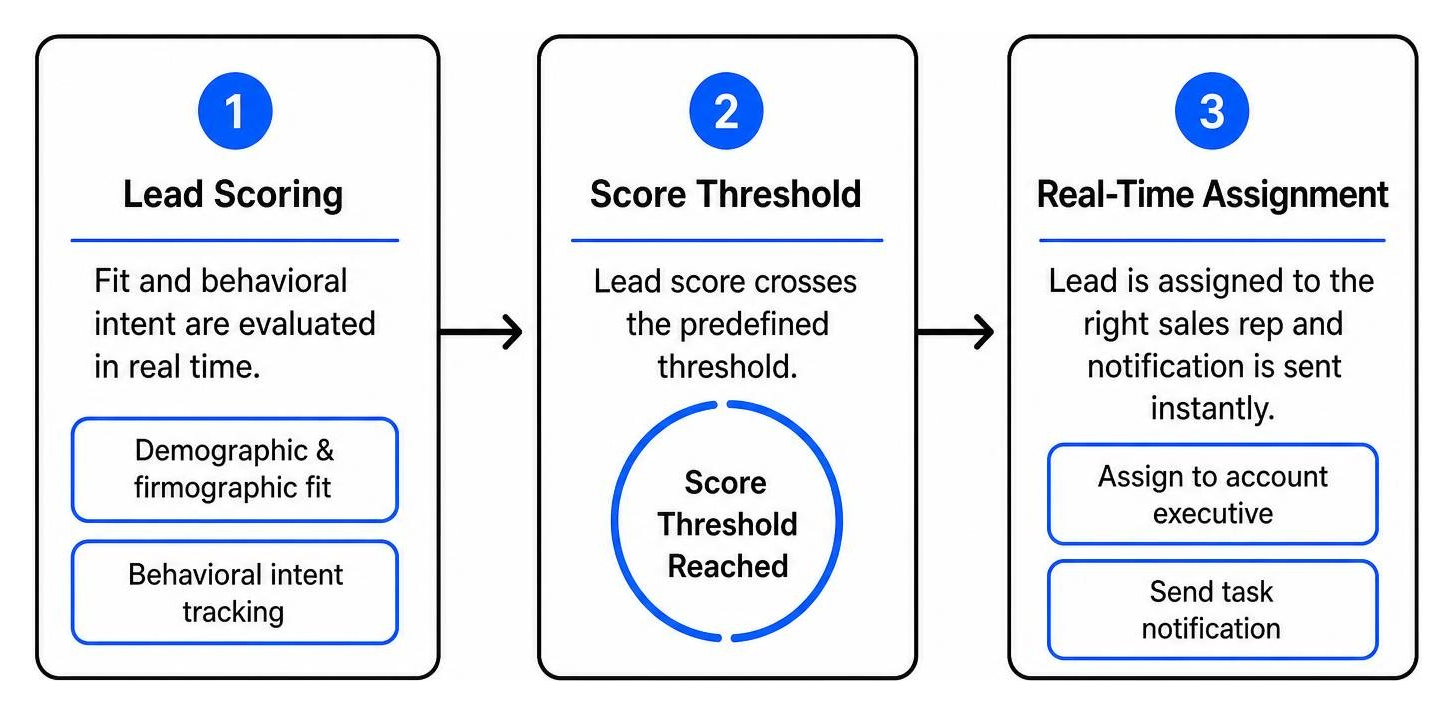
Integrated workflows eliminate this delay by evaluating fit and behavioral intent simultaneously:
- Demographic and firmographic fit: Data points like company size, industry, and job title establish baseline suitability.
- Behavioral intent tracking: High-value actions—such as visiting a pricing page, downloading a technical specification sheet, or requesting a demo—add weighted points to the prospect's profile.
- Automated routing SLAs: As soon as a lead crosses the predefined score threshold, the system assigns the record to the appropriate account executive and sends an automated task notification.
This real-time routing ensures sales reps engage prospective buyers while their intent is at its peak.
2. Context-Aware Automated Nurturing Across the Customer Lifecycle
Not every prospect is ready to speak with sales immediately. When uninterested leads are handed directly to reps, sales capacity is wasted. Conversely, leaving cold leads untouched results in lost pipeline.
Today, 71% of consumers expect personalized interactions, and 76% express frustration when messaging is generic. Context-aware nurture sequences solve this by personalizing outreach based on explicit CRM data:
- Dynamic content delivery: Emails automatically display case studies relevant to the prospect's specific industry or use case.
- Stalled deal reactivation: If an active opportunity goes quiet for 30 days, the CRM automatically moves the contact into an educational nurture workflow, alerting the rep when the prospect re-engages.
- Post-demo follow-ups: Prospects who complete a demonstration receive automated supporting assets tailored to the features discussed during the call.
Automating these touchpoints maintains prospect engagement throughout long evaluation cycles without requiring manual effort from sales reps for routine follow-ups.
3. Closed-Loop Website-to-Pipeline Attribution
A major challenge for growth teams is identifying which marketing investments generate actual revenue versus surface-level engagement.
By connecting website tracking with your central database, every form submission, gated content download, and chat conversation is logged directly against the customer record. At ROAZZ, our comprehensive performance marketing services focus on post-click business outcomes—such as completed demos, scheduled appointments, and closed contracts—rather than vanity metrics like impressions or clicks.
Connecting digital touchpoints to CRM deal stages gives your team complete closed-loop reporting:
- First-touch attribution: Identifies the original organic search term, paid campaign, or referral link that introduced the account.
- Multi-touch influence: Maps every digital asset consumed by decision-makers while an active deal is progressing.
- Budget reallocation: Enables marketing teams to shift ad spend toward channels and campaigns that generate the highest pipeline velocity and win rates.
4. AI-Driven Insights and Next-Best-Action Workflows
Modern automation platforms use machine learning to analyze customer interaction patterns across thousands of historical deals, helping teams prioritize their daily outreach.
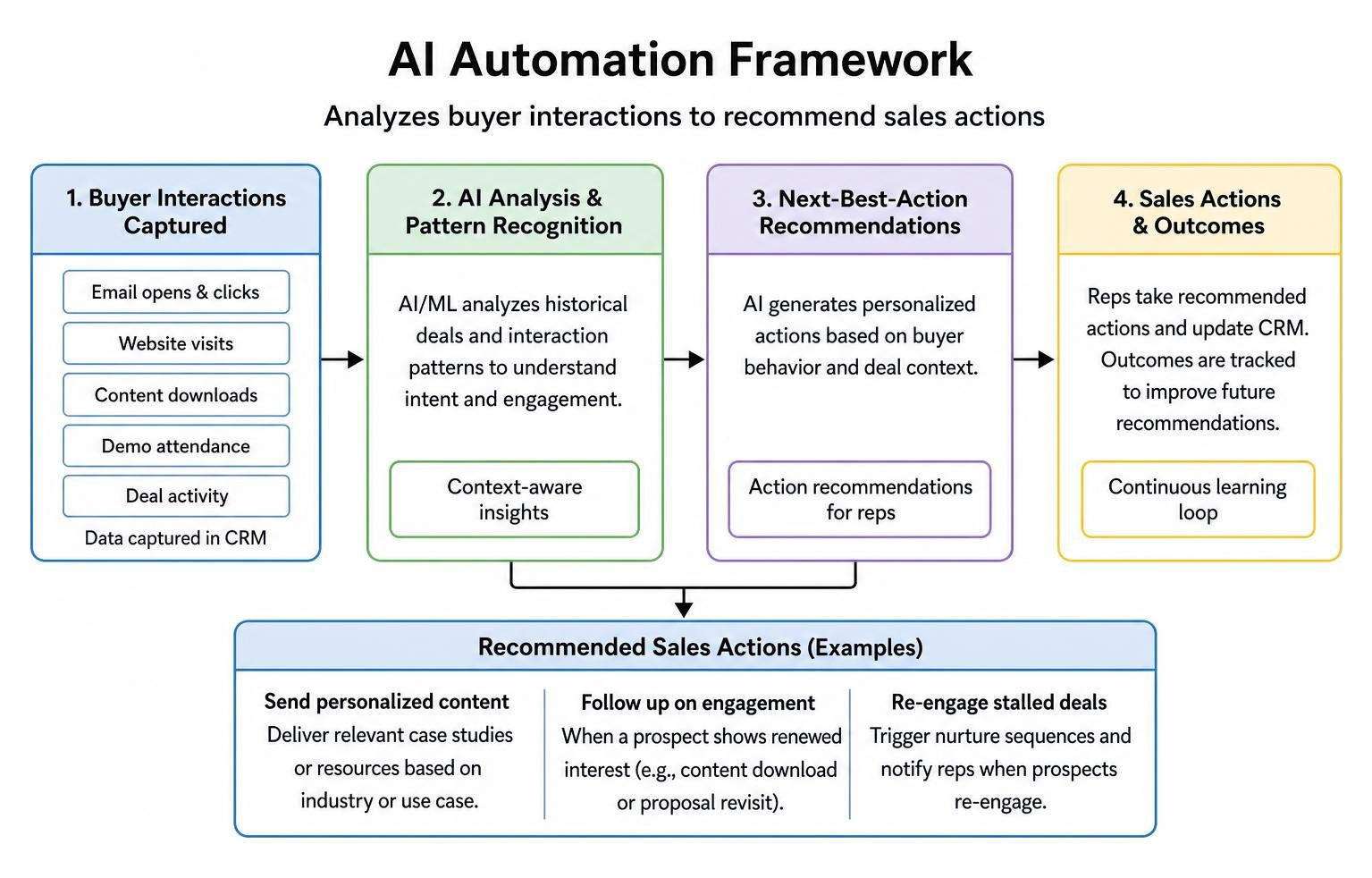
Key capabilities include:
- Predictive win scoring: Algorithms analyze pipeline data to highlight opportunities with the highest statistical likelihood of closing.
- Automated call and meeting summaries: Natural language processing extracts action items from customer conversations and automatically updates pipeline fields.
- Next-best-action prompts: When a prospect downloads a contract or revisits a proposal page multiple times, the system prompts the account executive with a tailored follow-up suggestion.
These automated insights ensure sales reps spend their time on high-probability opportunities with the context needed to move conversations forward.
Step-by-Step Implementation: How to Integrate Your Tech Stack
Executing a successful rollout requires clear technical alignment and data governance before turning on active workflows.

To see the structured methodology we use to plan, deploy, and optimize revenue engines, review how our integration process works.
Mapping Data Architecture and Customer Journeys
Before connecting systems, audit your customer records and map every stage of the buyer journey:
- Standardize data fields: Create a unified data dictionary that defines contact properties, opportunity stages, and lead statuses.
- Implement deduplication rules: Set unique identifiers (such as corporate email addresses or domain names) to merge duplicate records automatically.
- Establish lifecycle milestones: Define explicit criteria for transitions:
- Subscriber: Opted in for newsletter or blog updates.
- Marketing Qualified Lead (MQL): Met fit criteria and crossed behavioral scoring threshold.
- Sales Qualified Lead (SQL): Vetted and accepted by sales for discovery.
- Opportunity: Active deal with verified budget, timeline, and decision criteria.
- Configure consent management: Ensure tracking and communication permissions respect regional privacy frameworks (such as GDPR, CCPA, or CASL).
Setting Up Bi-Directional Sync for CRM Marketing Automation
A true integration relies on a bi-directional data flow, ensuring updates made by sales reps reflect immediately in marketing segments, and vice versa.
- Choose the integration method: Use native platform connectors for standard implementations, webhook listeners for custom events, or middleware platforms for multi-system enterprise environments.
- Define sync directionality: Keep high-level contact details, lifecycle stages, and deal statuses synced bi-directionally. High-volume raw behavioral logs (such as page views or email opens) should flow one-way into analytics storage to prevent database bloat.
- Set up error monitoring: Configure automated alerts to notify your technical team of failed API calls, schema mismatches, or sync timeouts.
- Test in a sandbox environment: Validate data accuracy using sample records before deploying workflows to your production environment.
Frequently Asked Questions About CRM and Marketing Automation
What is the primary difference between a CRM and marketing automation software?
A CRM functions primarily as the database of record for sales and account management teams, storing relationship histories, pipeline stages, contracts, and revenue numbers.
Marketing automation software focuses on top- and middle-of-funnel engagement, managing email cadences, form captures, landing pages, digital ad audiences, and lead scoring.
Connecting both platforms unifies top-of-funnel engagement with bottom-of-funnel deal tracking.
How do businesses measure the ROI of integrating CRM with marketing automation?
To measure financial return, track these core operational metrics:
- Sales cycle length: The average number of days required to move an opportunity from initial creation to closed-won.
- MQL-to-SQL conversion rate: The percentage of marketing-sourced leads accepted by sales reps.
- Pipeline velocity: The total monetary value of deals moving through your pipeline per unit of time.
- Customer acquisition cost (CAC): Total sales and marketing expenditures divided by the number of new customers acquired.
For additional answers regarding our outcome-driven methodologies, visit our common integration questions and answers.
What are the most common mistakes to avoid during integration?
- Syncing uncleaned legacy data: Migrating outdated, duplicate, or unverified contact lists into an automated system results in high bounce rates and poor deliverability.
- Over-automating prematurely: Building overly complex branching workflows before validating baseline conversion paths creates confusing customer experiences.
- Failing to align sales and marketing definitions: If sales and marketing disagree on what constitutes a qualified lead, automated handoffs will result in friction rather than deal acceleration.
- Neglecting field mapping documentation: Connecting custom properties without documenting field-type compatibility can lead to sync errors and lost interaction data.
Conclusion
Accelerating deal velocity requires removing operational friction between discovering a prospect and closing a contract. By unifying your customer database with automated marketing workflows, your organization eliminates manual data entry, shortens response times, and delivers personalized buying journeys at scale.
At ROAZZ, we help growth-focused teams design, launch, and optimize high-performance revenue campaigns focused entirely on bottom-line business outcomes. Ready to transform your customer acquisition strategy? You can explore performance marketing services to accelerate deal flow or reach out directly to our team through our contact page to begin building a unified revenue engine.