A Practical Guide to Customer Journey Email Automation for Fast-Growing Brands
Core Foundations of Customer Journey Email Automation
Most lifecycle marketing programs stumble because they treat email sequences like conveyor belts. A user enters at step one, gets bombarded for two weeks, and exits out the back regardless of what they actually did on your website or in your app.
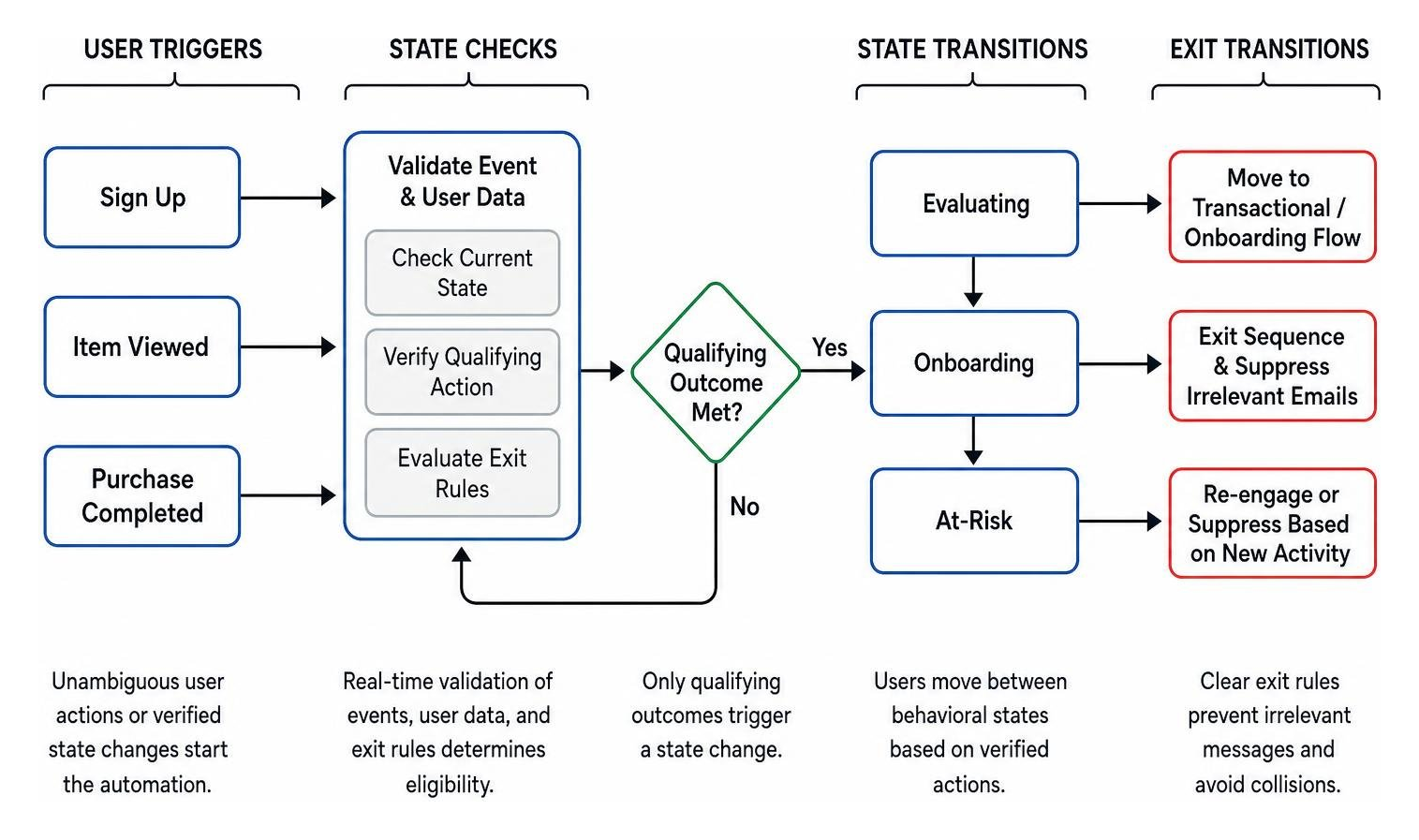
Building robust automation requires shifting from static timelines to a state machine architecture. In a state-driven setup, a customer occupies a specific behavioral status (such as Evaluating, Onboarding, or At-Risk). They only transition to a new state when verified data proves they took a qualifying action.
This architecture requires four operational rules:
- Explicit Triggers: Every send must originate from an unambiguous user action or verified state change, not arbitrary calendar dates.
- Dynamic Transition Logic: When a customer completes a target outcome (like making a purchase), the system immediately moves them out of exploratory sequences and into transactional and onboarding flows.
- Strict Exit Criteria: Clear exit rules prevent users from receiving irrelevant messages when their situation changes.
- Continuous Audience Suppression: Active high-priority sequences (like checkout recovery) must suppress general marketing broadcasts to avoid message collisions.
Modeling Behavioral States and Trigger Transitions
To model your lifecycle successfully, you must define the exact technical payload required for each transition. A behavioral trigger cannot simply rely on fuzzy assumptions; it requires clean event data with timestamps, user attributes, and situational context.
When an event fires—such as an account creation or item view—your automation engine must perform real-time validation:
- Timestamp Integrity: Verify that the event occurred within an acceptable operational window (e.g., cart events older than 24 hours should not trigger immediate recovery sequences).
- State Persistence: Check whether the user currently resides in an incompatible state (e.g., someone with an open high-priority support ticket should not receive an upsell sequence).
- Payload Verification: Ensure mandatory metadata exists (e.g., product SKU, price, user subscription tier) before assembling dynamic copy.
By treating contacts as entities moving through state boundaries, you prevent embarrassing logic failures—like sending a "Finish setting up your profile!" email three minutes after a customer already completed their account.
Priority Hierarchies and Suppression Rules to Avoid Conflicting Sends
One of the quickest ways to erode brand trust is sending conflicting messages on the same afternoon: a promotional flash sale blast, a cart recovery reminder, and a survey request.
To manage multiple concurrent campaigns, configure a clear priority hierarchy:
- Priority 1 (Transactional & Critical Account Alerts): Password resets, purchase confirmations, order tracking. These bypass marketing suppressions.
- Priority 2 (High-Intent Behavioral Flows): Cart abandonment, checkout completion, onboarding activation milestones.
- Priority 3 (Nurture & Lifecycle Re-engagement): Educational sequences, browse follow-ups, win-back flows.
- Priority 4 (Broadcasts & Newsletters): General announcements, seasonal promotions, monthly updates.
When a contact enters a Priority 2 journey, implement automated suppression across Priorities 3 and 4. Platforms that support building automated journeys let you set segment-based delays, exit conditions, and suppression lists to prevent message overlap and maintain list hygiene.
Mapping Lifecycle Stages: From Acquisition to Win-Back
Customer journeys are rarely linear, but user intent tends to cluster around specific lifecycle milestones. Designing effective automation requires aligning the message purpose, trigger conditions, and exit logic for every stage.
| Lifecycle Stage | Primary Behavioral Trigger | Core Conversion Goal | Key Messaging Strategy | Exit Conditions |
|---|---|---|---|---|
| 1. Entry & Orientation | Form submission, account creation, or lead-magnet download | Initial profile completion or first product exploration | Set clear expectations, deliver promised assets, introduce brand value | First purchase, account activation, or unsubscription |
| 2. Active Evaluation | High-intent browsing, pricing page views, repeated visits | Trial signup, demo booking, or initial purchase | Address friction points, share social proof, clarify feature tiers | Checkout completed or inactivity exceeding 30 days |
| 3. Purchase Recovery | Cart creation or checkout start without transaction event | Completed transaction | Clear product breakdown, dynamic inventory alerts, friction removal | Order placed, cart emptied, or recovery window expired |
| 4. Onboarding & Activation | Order confirmation or account provisioning | Reaching key activation milestone (e.g., setup completion) | Step-by-step guidance, implementation tips, support resources | Core milestone reached or direct handoff to account management |
| 5. Retention & Expansion | Product usage thresholds, replenishment intervals, loyalty milestones | Repeat purchase, feature upgrade, or subscription renewal | Timely replenishment reminders, workflow tips, personalized cross-sells | Upgrade completed, renewal processed, or opt-out |
| 6. Re-engagement & Win-Back | No purchases, logins, or site activity for 60–90 days | Account reactivation or explicit preference update | Low-friction re-discovery, feedback request, preference center options | User re-engages, pauses subscription, or enters suppression |
Implementing Customer Journey Email Automation for Onboarding and Activation
The window immediately following a signup or first purchase is critical for long-term retention. Industry data consistently shows that selling to an existing customer has a success rate of 60% to 70%, compared to just 5% to 20% for cold prospects. Activation during onboarding is what secures that long-term value.
For direct to consumer brands and SaaS platforms alike, onboarding emails should guide users toward a specific behavioral milestone rather than dumping every product feature into a single message.
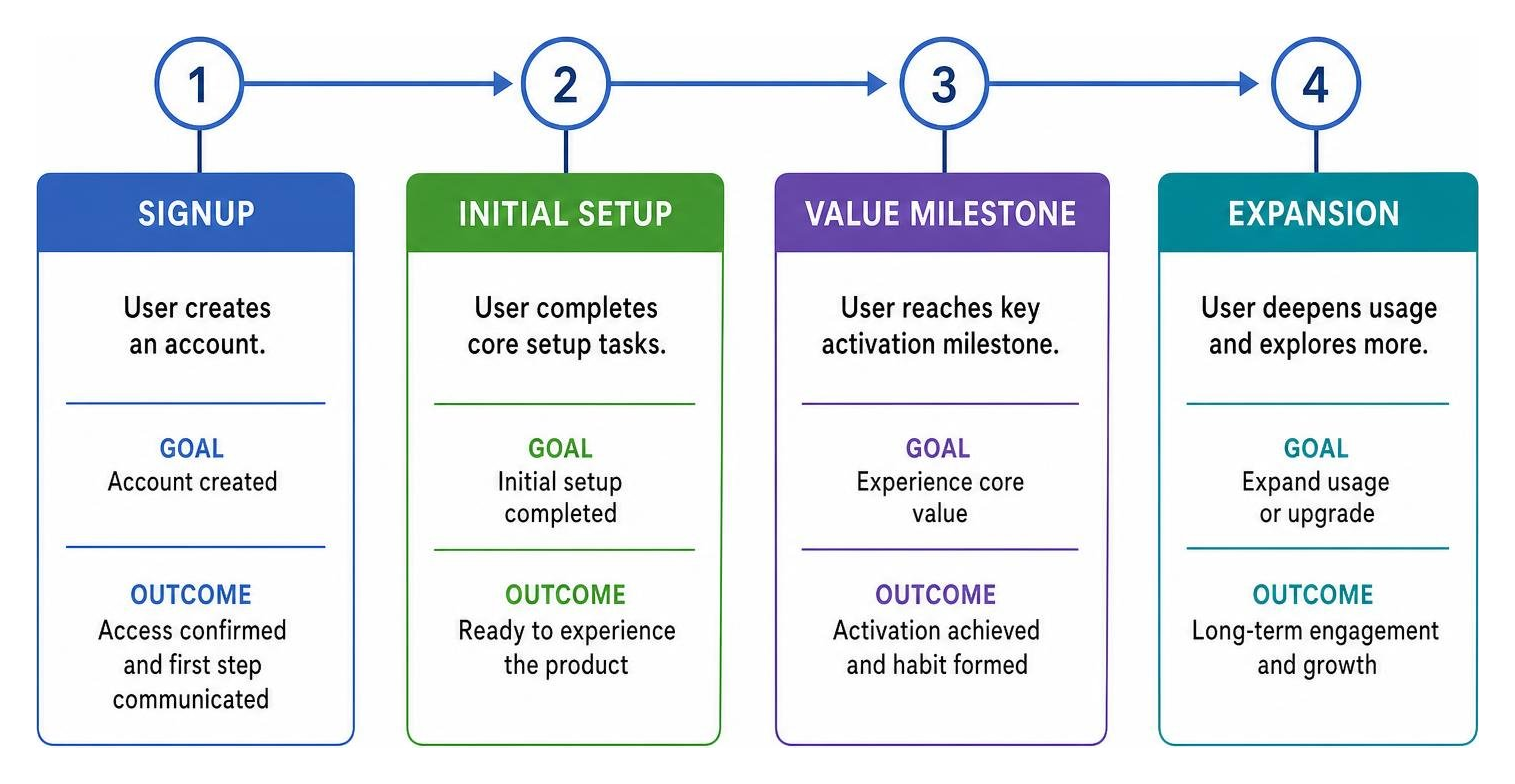
When designing lifecycle onboarding workflows, structure your sequence around distinct user milestones:
- Email 1 (Immediate): Confirmation, access credentials, and the single most critical first step.
- Email 2 (Day 2–3): Targeted troubleshooting or practical tips for users who have not yet reached their initial milestone.
- Email 3 (Day 5–7): Community spotlights, case studies, or advanced tips for users who completed their initial setup.
Always use exit rules on onboarding workflows: as soon as a user hits the target activation criteria, immediately remove them from beginner instructional flows so they don't receive redundant setup reminders.
Scaling Customer Journey Email Automation for Nurturing, Cart Recovery, and Retention
Post-acquisition revenue depends heavily on high-intent recovery and retention triggers.
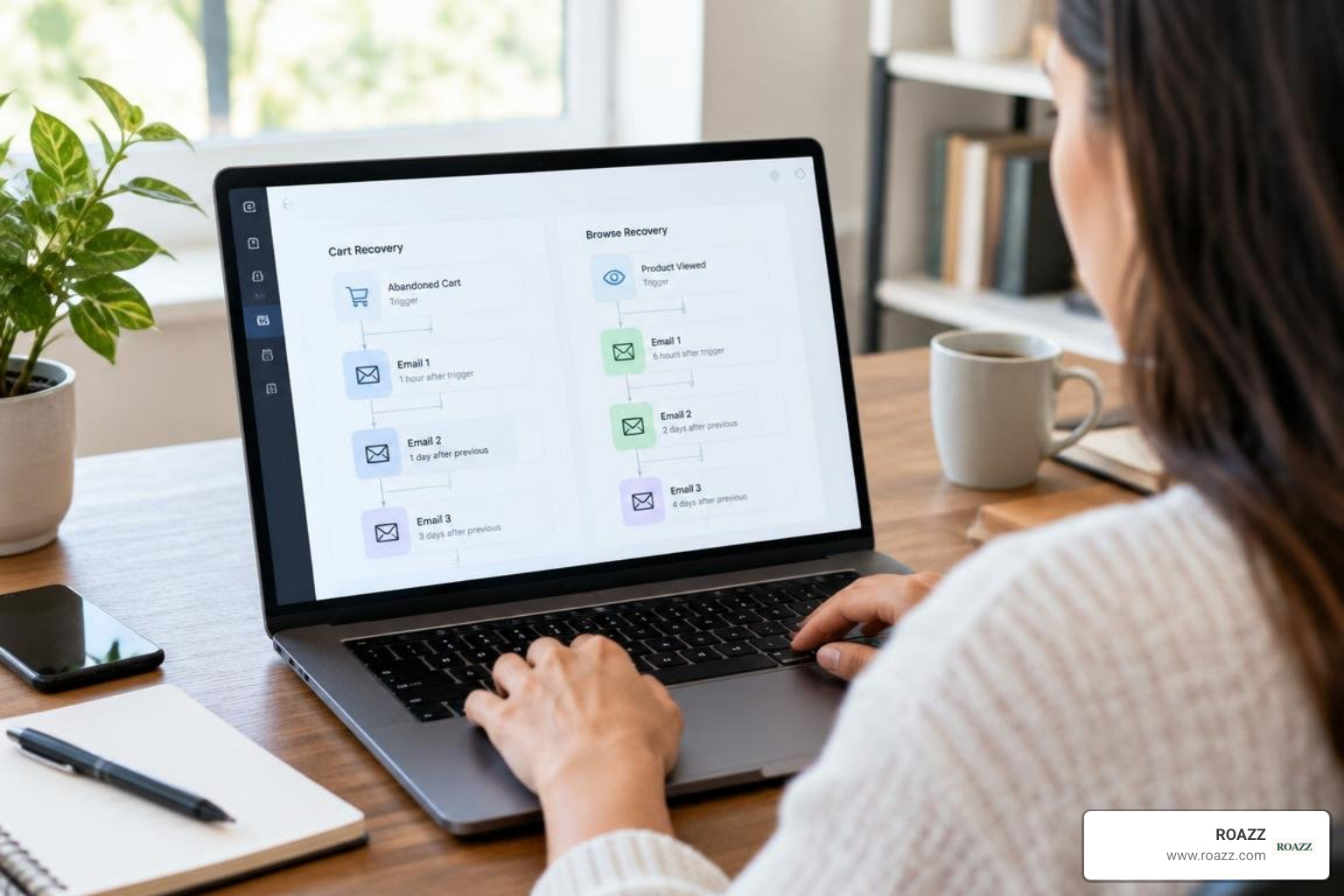
1. Abandoned Cart and Checkout Recovery
Cart recovery flows should be timely and focused on resolving buying hesitation:
- Send 1 (1 to 4 hours post-abandonment): A helpful reminder showing exact cart contents, sizing/specifications, and direct checkout links.
- Send 2 (24 hours post-abandonment): Answers to common questions, shipping details, return policies, and customer reviews.
- Send 3 (48 to 72 hours post-abandonment): A final notice regarding cart expiration or inventory limits, providing a clean path to complete or clear the order.
2. Replenishment and Cross-Sell Flows
For recurring purchases or consumable goods, set dynamic triggers calculated from the customer's average re-order window. If a customer typically buys every 45 days, trigger a gentle replenishment prompt at day 35—well before they run out or turn to a competitor.
3. Win-Back Workflows
When a user has shown zero activity for 60 to 90 days, remove them from regular marketing broadcasts and enroll them in a dedicated re-engagement series. Ask if their needs have changed, offer an easy way to update communication preferences, or provide a direct reason to return. If they remain inactive after three messages, move them to a dormant suppression list to safeguard your sender reputation.
Advanced Personalization, AI Logic, and Modern Deliverability
Modern lifecycle marketing goes far beyond basic token replacement like inserting {{ customer.first_name }}. Fast-growing brands use dynamic logic, machine learning models, and real-time data inputs to tailor message content and timing to each recipient.

Enhancing Journeys with Real-Time AI and Dynamic Attribute Generation
Integrating AI models into your automation stack allows you to classify user intent and generate personalized content blocks on the fly. Rather than manually writing hundreds of minor copy variations, you can leverage LLM actions in workflow automation to evaluate user activity and generate custom recommendations within your flows.
Key use cases for real-time AI logic include:
- Intent Categorization: When a lead submits a free-text inquiry or questionnaire, an LLM action can classify their primary interest (e.g., enterprise scalability vs. simple self-serve setup) and assign a journey attribute that routes them down the right path.
- Dynamic Content Synthesis: Summarizing recent product browsing behaviors or app interactions into a personalized "recommended next steps" block.
- Tone Adjustment Based on Account Tier: Automatically adjusting email formality and copy depth based on account size or customer history.
Crucial Implementation Rule: Always define fallback values for any dynamic attribute generated by AI. If a model fails to return a response or encounters an API timeout, your template must seamlessly render a clean default message rather than a broken or blank layout.
Technical Deliverability, Consent Management, and Machine-Click Filtering
Even the most sophisticated journey logic is useless if your emails land in the spam folder or trigger compliance penalties. Maintaining enterprise-grade deliverability requires continuous technical hygiene:
1. Authentication Standards
Ensure your sending infrastructure enforces strict authentication:
- SPF (Sender Policy Framework): Authorizes your sending ESP IP addresses.
- DKIM (DomainKeys Identified Mail): Digitally signs your emails to prevent tampering in transit.
- DMARC (Domain-based Message Authentication, Reporting, and Conformance): Enforces alignment between SPF/DKIM and protects your domain reputation against spoofing.
2. Consent and Unsubscribe Mechanics
Implement list-unsubscribe headers supporting RFC 8058 one-click unsubscribe functionality. Ensure that unsubscriptions are immediately synchronized across your email service provider, customer data platform (CDP), and CRM. Separate transactional messaging streams from commercial marketing streams to prevent critical account notices from being blocked.
3. Filtering Machine Clicks and False Signals
Security software and anti-spam filters frequently pre-screen emails by opening links automatically. If your automation triggers high-intent workflows based purely on a single link click, you risk sending aggressive follow-ups to people who never actually visited your site.
To filter out machine noise:
- Use hidden honeypot links in template footers that real humans won't click. If a click event registers on that hidden link, flag the session as a bot and ignore it.
- Require multi-signal verification (such as an email click followed by an on-site pageview or session event) before moving a user into a high-intent sales sequence.
- Avoid using raw open rates as transition triggers.
Measuring Incremental Revenue and Quality Assurance
A common mistake in lifecycle marketing is attributing every downstream purchase to an automated email simply because the customer received a message before buying. True performance marketing isolates the incremental lift created by your automation over what would have occurred naturally.
Understanding your baseline conversion rates is an essential part of our performance marketing methodology. By tracking post-click outcomes—such as verified purchases, booked demos, and subscription activations—you ensure marketing budget and automation workflows drive genuine revenue expansion.
Establishing Holdout Groups and Measuring True Conversion Lift
To measure whether an automated workflow produces incremental business value, implement continuous holdout testing. A holdout group is a randomly assigned percentage of eligible users (typically 10% to 20%) who trigger the entry criteria for an automation but are suppressed from receiving the messages.
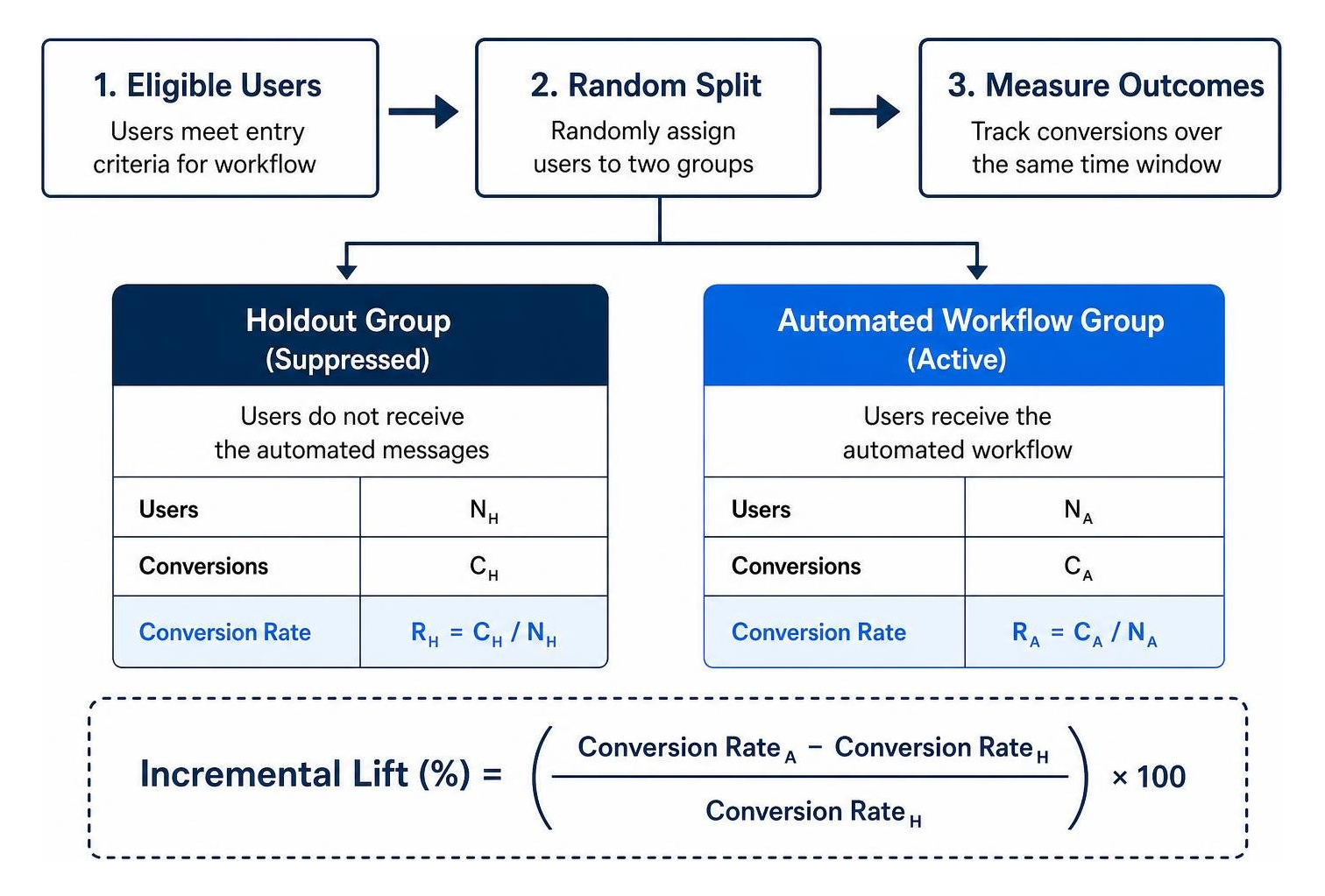
By comparing the conversion rate of the holdout group against the active automation group over an identical time window, you can calculate the exact net impact of your messaging:
$$\text{Incremental Lift (\%)} = \left(\frac{\text{Conversion Rate}{\text{Automated}} - \text{Conversion Rate}{\text{Holdout}}}{\text{Conversion Rate}_{\text{Holdout}}}\right) \times 100$$
For example, if a 500-person holdout group achieves 50 activations (a 10% baseline conversion rate) while a 500-person automated group achieves 60 activations (a 12% conversion rate), the automation produced a 2-percentage-point absolute lift and a 20% relative increase in activations. This clear proof of incremental value keeps your team focused on flows that actually move the needle.
Pre-Launch Workflow Testing and Data Freshness Protocols
Before turning on any automated journey, run a systematic quality assurance check:
- Seed Profile Traversal: Run test user profiles containing various attribute permutations through the workflow to confirm conditional branching and delay timers work as intended.
- Polling Lag Verification: Account for segment refresh frequencies. Many segment-based triggers evaluate every 5 to 15 minutes rather than instantaneously. Ensure your timing logic accommodates these polling intervals without breaking the user experience.
- Payload Schema Validation: Verify that event properties (such as pricing numbers, currency formats, and product image URLs) match your dynamic email template variables.
- Edge-Case Stress Testing: Verify how your system handles edge cases, such as a user triggering the same event three times in two minutes, or a contact unsubscribing while resting in a wait-delay step.
Frequently Asked Questions About Customer Journey Email Automation
How many automated workflows does a high-growth brand actually need to start?
You don't need dozens of complex workflows on day one. Most fast-growing brands see 80% of their automation revenue from four core sequences:
- A high-impact Welcome & Orientation Flow that delivers immediate value.
- An Activation/Onboarding Flow focused on getting users to their first product milestone.
- An Abandoned Cart/Checkout Recovery Sequence to capture active buying intent.
- A Customer Re-engagement Flow to win back lapsed users or clean inactive contacts from your list.
Build these four foundational workflows first, validate their performance with holdout groups, and expand only when you have clean data to support more granular branching. For more insights on scaling your acquisition and retention programs, visit our frequently asked questions.
Why are open rates considered unreliable when optimizing automated journeys?
Open rates have become a noisy vanity metric due to privacy features like Apple Mail Privacy Protection (MPP), which automatically pre-fetches and opens email images on remote proxy servers. This inflates recorded open rates regardless of whether a human opened the email.
Additionally, corporate spam filters often scan incoming links, generating false open and click signals. Relying on opens to trigger subsequent journey steps can lead to poorly timed messages. Instead, optimize your flows around downstream post-click behaviors, including on-site sessions, cart updates, completed purchases, and feature activations.
What is the most effective way to prevent message overlap across active sequences?
The cleanest solution is implementing a centralized priority hierarchy combined with journey exit conditions. When a user qualifies for a high-priority sequence (such as a cart recovery flow), assign them a temporary status tag that suppresses all general marketing broadcasts, nurture drips, and promotional announcements.
Once the user completes the purchase or the high-priority sequence finishes, remove the suppression tag so they can smoothly return to normal lifecycle communications.
Building High-Impact Automated Journeys with ROAZZ
At ROAZZ, we believe email automation should be measured by bottom-line business growth—not vanity metrics or raw send volume. We design, launch, and optimize high-performance lifecycle campaigns laser-focused on post-click outcomes: completed sales, booked appointments, qualified demos, and active subscriptions.
By combining state-driven journey architecture, advanced segmentation, and clear conversion lift measurement, we help high-growth brands turn lifecycle marketing into a reliable, scalable engine for customer retention.
Explore our full suite of performance marketing services to see how we build high-impact customer journey systems tailored to your business goals.